

The old barrier in music software was never only technical skill. It was the distance between an idea and a usable result. Someone might hear a hook in their head, imagine a moody electronic intro, or sketch a few lines of lyrics late at night, then stop there because arranging, recording, and polishing the piece required tools and experience they did not have. What makes AI Music Generator interesting is not simply that it can produce audio quickly, but that it reduces the gap between a rough intention and a listenable draft.
That shift matters because creative work rarely begins with precision. It begins with fragments: a mood, a chorus line, a reference to tempo, or a vague sense that the track should feel cinematic rather than minimal. In my reading of the official pages, ToMusic is built around exactly that uncertain starting point. It offers both a simpler prompt-based path and a more controlled custom workflow, which suggests the product is designed for people who sometimes want speed and sometimes want direction.
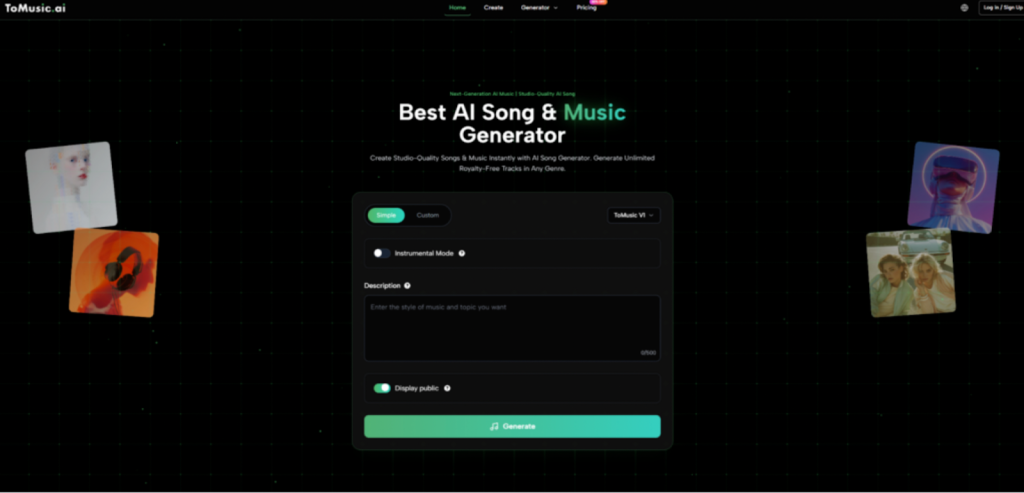
The platform’s value, then, is not best understood as “automatic songwriting.” A better way to frame it is assisted translation. You bring words, structure, stylistic hints, or lyrics. The system turns those instructions into an audio draft that can be judged, refined, replaced, or repurposed. That makes it less like a one-click magic box and more like a flexible sketch engine for musical ideas.
Why Text Inputs Matter More Than Ever
Most new creative software succeeds or fails based on how well it interprets incomplete intent. In visual tools, this often means prompts and image references. In AI music, it means describing genre, energy, pacing, instrumentation, and voice expectations in a way the model can convert into composition. ToMusic’s official explanation emphasizes that its system analyzes text for things like mood, tempo, genre, and instrumentation before generating a result.
That detail is important because it changes how a user should think about prompting. You are not merely giving the platform a topic. You are supplying compositional constraints in natural language. A prompt that says “warm acoustic folk with light percussion and reflective female vocals” is more useful than one that says “make a nice song.” The platform appears to reward specificity without requiring technical music theory vocabulary.
From Description To Musical Direction
A strong text prompt does three jobs at once. It defines atmosphere, signals pacing, and limits stylistic drift. In practice, that means a user can guide the system toward mellow piano pop, energetic dance production, ambient soundtrack textures, or lyric-led ballad writing without opening a traditional workstation.
This is where Text to Music feels less like a novelty feature and more like a practical workflow. The official pages present it as a route from descriptive language to full audio, which is useful for creators who think in scenes, emotions, or use cases rather than chord charts.
Why Custom Lyrics Change The Equation
Prompt-based generation is fast, but lyric support pushes the platform into a different category. According to the official materials, users can enter their own lyrics in custom mode, include structure tags such as verse and chorus, and shape the track around that written material. That means the system is not only inventing music around a broad concept; it is also trying to organize musical form around user-authored language.
For creators, this is a major difference. It allows a songwriter to keep the narrative, phrasing, and thematic core of a piece while outsourcing parts of melody, arrangement, and vocal realization to the model.
How The Platform Actually Operates
The official workflow suggests a process that is simple on the surface but layered underneath. Rather than forcing every user into one rigid path, ToMusic seems to offer two entry points and several control fields around them.
Simple Mode For Fast Drafting
Simple mode appears to be the faster path. You describe the kind of song you want, and the system handles most of the musical interpretation. This is useful when speed matters more than precision, or when you want to explore multiple directions before committing to one.
The benefit here is not perfection. It is iteration. A user can test several emotional angles for the same project and compare results.
Custom Mode For Tighter Intent
Custom mode is where the platform becomes more deliberate. The official pages show fields for title, styles, lyrics, instrumental settings, visibility, and generation. That suggests a workflow meant for people who know what they want to preserve. You can shape the prompt, control whether the output is instrumental, and provide the actual lyrical content.
Multiple Models Inside One System
One of the more notable parts of the official FAQ is the multi-model structure. ToMusic presents four models—V1, V2, V3, and V4—with different strengths. In broad terms, the descriptions point to faster general output at one end and more expressive vocals, richer harmonies, or longer compositions at the other.
That matters because many users do not actually need “the best possible model” every time. Sometimes they need speed. Sometimes they need stronger vocal realism. Sometimes they need a longer composition. A multi-model setup makes the platform feel more like a toolkit than a single fixed generator.
A Practical Workflow For First-Time Users
The official pages support a workflow that can be understood in four steps.
Step One Defines The Creative Path
Choose whether you want a simple prompt-led generation or a custom setup with your own lyrics and stronger control. This decision shapes the rest of the session.
Step Two Builds The Input Layer
Enter the text description or add lyrics, then fill supporting fields such as title and style cues. If the goal is a backing track rather than a sung piece, switch to instrumental generation.
Step Three Runs The Generation
Start the generation and let the selected model interpret the instructions. At this stage, the goal is not to assume the first result is final, but to evaluate whether the style, pacing, and vocal character match the intention.
Step Four Reviews And Reuses Outputs
Generated tracks are saved in the music library according to the official pages, which means users can revisit drafts, organize outputs, and download them in available formats.
Why The Library Matters Operationally
The library is easy to overlook, but it changes the platform from a demo into a working environment. If tracks, metadata, lyrics, and parameters are retained, then the user’s process becomes cumulative rather than disposable.
Where The Product Feels Most Useful
The official site highlights social media, marketing, production, education, and personal projects. That range is believable because the platform is not built around a single genre identity. It is built around conversion from language into music.
For a content creator, this could mean quick theme music or background tracks. For a marketing team, it could mean testing variants of a jingle. For an independent songwriter, it might mean exploring melodic directions without building every arrangement manually. For a student or hobbyist, it offers a way to hear ideas rather than leave them on the page.
What The Feature Set Suggests
A comparison helps clarify where ToMusic places its emphasis.
| Aspect | What ToMusic Emphasizes | Why It Matters |
| Input style | Text prompts and custom lyrics | Supports both quick ideas and planned songs |
| Workflow design | Simple mode and custom mode | Lets users choose speed or control |
| Model structure | Four music models | Different strengths for different tasks |
| Output type | Vocal songs and instrumental tracks | Useful across multiple creative scenarios |
| Storage | Saved music library | Supports iteration and retrieval |
| Export options | WAV, MP3, stems on supported plans | Makes outputs easier to reuse |
What Feels Promising In Real Use
In my view, the strongest idea behind the platform is not that it replaces musicianship. It is that it lowers the cost of musical experimentation. A person can test whether a lyric should become a ballad, a synth-pop track, or an ambient piece without producing each version manually.
That is especially relevant for modern creative work, where music is often part of a larger package: short videos, product storytelling, tutorials, stream branding, or small-scale indie projects. Fast generation has more value when it supports decision-making, not just novelty.
This is also where Lyrics to Music AI becomes more interesting than a generic sound generator. It gives written language a stronger role in the final piece, which matters for creators who care about message, phrasing, and narrative.
What Users Should Keep In Perspective
A balanced view matters here. AI music systems are useful, but they are still highly dependent on input quality. Better prompts usually produce better results. Clearer lyrics usually create more coherent song structures. Even with multiple models, users may need several attempts before finding a version that feels right.
Prompt Quality Still Shapes Outcomes
The platform may understand genre and mood cues, but vague instructions still create vague outputs. This is not really a flaw; it is the tradeoff of text-driven generation.
Iteration Is Part Of The Method
The first version should often be treated as a draft, not a verdict. In creative work, the advantage of systems like this is that revision is cheap. You can modify style language, switch models, or refine lyrics until the piece moves closer to your target.
Control Has Practical Limits
Even a structured custom mode does not guarantee microscopic control over every arrangement detail. Users who expect exact producer-level editing from a text interface may still find boundaries.

Why This Category Keeps Growing
The broader reason tools like ToMusic matter is that music creation is no longer confined to specialists. More people now need original audio for content, campaigns, products, and personal expression. That creates demand for software that translates intent into usable music with less friction.
Seen from that angle, ToMusic is best read as part of a larger shift in creative software: interfaces are becoming less technical and more linguistic. Instead of asking users to master a production environment first, the tool lets them start from description and refine from there.
That may not remove the value of traditional composition or production. But it does expand who gets to begin. And in many creative fields, the ability to begin quickly is what determines whether an idea survives long enough to become something real.

Sharon Howe is a creative person with diverse talents. She writes engaging articles for WonderWorldSpace.com, where she works as a content writer. Writing allows Sharon to inform and captivate readers. Additionally, Sharon pursues music as a hobby, which allows her to showcase her artistic abilities in another creative area.